Live earnings
See gross and net earnings with your hourly rate, currency, and fixed daily cost.
 Voltura Earner
For Windows
Voltura Earner keeps your tasks, time, and earnings together in a small Windows companion. Track your regular day and keep going into overtime.

See it in action
A quick look at tasks, live earnings, overtime, and reports, using sample work data.
Watch the 70-second tourA clearer working day
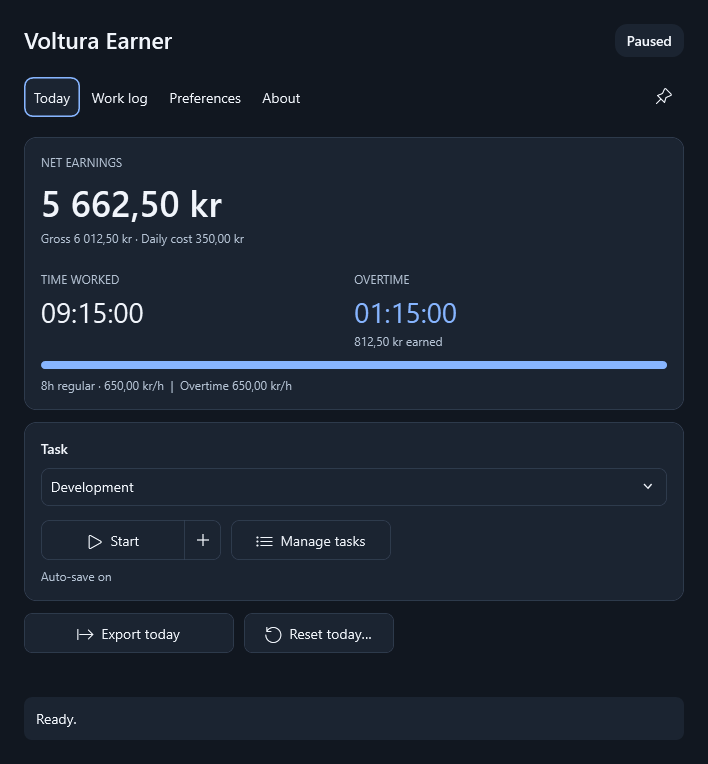
Choose a task, start tracking, and let Earner handle the totals.
See gross and net earnings with your hourly rate, currency, and fixed daily cost.
Choose what happens at your daily limit: stop tracking, continue at your normal rate, or use a separate overtime rate.
Track up to 40 tasks, correct individual entries, and export clear Excel reports.
Beside the Windows clock
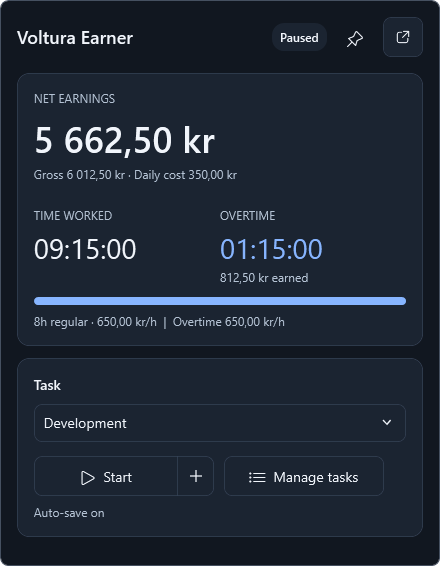
Left-click the tray icon for a compact live view of your earnings, time, and current task.
Start or pause directly from the popup. It shares the same work session as the main window, so switching views keeps everything together.
Drag the header to move it beside your work. Pin it to keep it open above other windows. The pin is independent of the main window.
Click the icon again or press Escape to hide it. Clicking elsewhere hides it when it is unpinned. Reopening restores its position beside the tray.
More when you need it
Switch tasks, pause for a break, and resume when you are ready. New app sessions start paused.
Deduct your fixed daily cost once per day. Historical rates and currencies remain attached to their entries.
See daily totals for each task. Add missing work, review individual entries, or remove a mistake. Editing pauses tracking.
Export today, this week, month, year, or all history. Reports include regular time, overtime, and separate currency totals.
Choose from 21 languages, light or dark appearance, storage folders, startup behavior, notifications, and automatic reports.
Installed copies can download verified updates. You choose when to save your work, install, and restart.
Small and practical
Get Voltura Earner
The first release is being prepared. Published packages will appear on the releases page. You can also build the current source using the contributing guide.
View releasesA smaller download. Installs the Microsoft .NET 10 Desktop Runtime if needed.
Setup-…-win-x64.exeIncludes the runtime, without a separate runtime download.
Setup-…-win-x64-full.exeExtract to a writable folder and run without installation.
…-win-x64.zipGetting started
Choose an hourly rate, daily cost, currency, and regular hours in Preferences.
Start tracking from Today or the live tray window. Pause when you stop working.
Use Work log to review your entries and save an Excel report for the period you need.
At your daily limit, Earner follows your overtime preference: stop, continue at the normal rate, or use a different overtime rate. Tracking pauses at midnight and when Windows goes to sleep. Open or restart the app when you are ready, then explicitly start tracking. Time spent paused is not counted.
Voltura Earner is a fresh WPF application with its own settings and work history. It does not import or modify the original Earner app's data.
Installed copies can check for signed updates and download them automatically; you choose when to install. Installing an update saves your work and closes Earner; reopen it if you cancel setup. Exit Earner before running a downloaded installer or uninstaller. Portable copies use manual downloads.
Your work stays on your computer. Update checks contact GitHub, and the standard installer may download the runtime from Microsoft. Read the privacy policy.
